
Topic 6 of 9 · Lab VII
UML Use Case Diagrams
Actors, use cases and system boundaries; association, include, extend and generalization; use case descriptions with main and alternative scenarios, using the ATM system.
← → move between slides · F full screen · M slide list
Before we start
Why this matters
A bank manager does not care about classes or tables. She wants to know: what can a customer do at this machine?
A use case diagram answers that on one page. It turns the SRS into goals that users recognise and fixes the scope: what is inside the system and who is outside.
It is also the bridge to the next diagrams: every use case becomes one or more sequence diagrams.
Outline · Lab VII
Topics in this chapter
Select a topic to jump to the slide that explains it.
Concept 1 of 12
What a use case diagram shows
A use case is a goal a user achieves with the system, together with the scenarios (success and failure) that happen along the way. A use case diagram is a UML behaviour diagram that shows the actors, their use cases and the relationships between them.
- It captures the user’s view: what the system offers, not how it works inside.
- It organises the functional requirements of the SRS.
- It fixes the system’s scope: what is inside the boundary and who is outside.
- Each use case is later described in text and detailed in sequence diagrams (topic 7).
Concept 2 of 12
The notation
Concept 2 of 12
The notation (cont.)
| Element | Meaning |
|---|---|
| Actor (stick figure) | a role outside the system that interacts with it: a person, organisation or another system |
| Use case (ellipse) | a goal, named verb + object: “Withdraw cash” |
| System boundary (box) | what is inside the system; actors stay outside |
| Association (solid line) | this actor takes part in this use case |
| Generalization (hollow triangle) | a specialised actor or use case inherits from a general one |
| «include» | the base use case always uses the included one |
| «extend» | the extension adds optional behaviour to the base |
| Package (folder) | groups related use cases in big diagrams |
Notation
Actors: roles, not people
- An actor is a role. One person can play several roles (a librarian who also borrows books is both Librarian and Member).
- Primary actors start a use case to reach their goal (Customer). They are usually drawn on the left.
- Secondary (supporting) actors help the system do its work (Bank server, SMS gateway, payment gateway). Usually on the right.
- Time can be an actor for scheduled jobs (“Send due-date reminder” started by a Clock).
- The system itself, its database and its screens are never actors.
| Is it an actor? | Answer |
|---|---|
| Customer | ✓ primary |
| Bank central computer | ✓ secondary (external system) |
| ATM database | ✗ part of the system |
| Card reader | ✗ usually part of the ATM system |
| Mr. Karim | ✗ a person; use his role |
Concept 4 of 12
Include, extend and generalization
Concept 4 of 12
Include, extend and generalization (cont.)
| «include» | «extend» | |
|---|---|---|
| Meaning | the base always performs the included behaviour | the extension sometimes adds behaviour to the base |
| Arrow | from base → included | from extension → base |
| The base without it | is incomplete | is complete |
| Typical use | shared steps (authenticate, validate card) | optional or exceptional steps (print receipt, pay fine) |
| Condition / extension point | none | named in the base use case |
Interactive
Include or extend?
Concept 6 of 12
The ATM use case diagram
Concept 6 of 12
The ATM use case diagram (cont.)
- Customer (primary) starts all four transactions.
- Bank server (secondary) is involved in each, because the ATM must ask the bank for account data.
- Every transaction «include»s Authenticate: it always happens first.
- Handle excess amount «extend»s Withdraw cash at the extension point “excess amount” — only when the amount is too large.
Redrawn from the manual’s Figure VII.14 (Request Cash, Request Balance, Request Statement, Request Balance Transfer, User Identify, Process Excess Amount).
The ATM example
Describing a use case in text
The diagram is only an index. Each use case also needs a use case description (specification):
| Field | Withdraw cash (UC-02) |
|---|---|
| Actors | Customer (primary), Bank server (secondary) |
| Precondition | The ATM is in service and has cash |
| Trigger | The customer inserts a card |
| Main success scenario | 1 Insert card · 2 system reads the card · 3 system asks the bank for account details · 4 system asks for the PIN · 5 customer enters PIN · 6 PIN authenticated · 7 customer enters amount · 8 system checks the balance with the bank · 9 cash dispensed, account debited · 10 card returned, receipt printed |
| Alternative flows | 2a card unreadable → return card, end · 3a bank unreachable → return card, end · 6a wrong PIN → two more tries; third failure keeps the card · 8a insufficient funds → enter a smaller amount or cancel |
| Postcondition | Account debited by exactly the cash dispensed; transaction recorded |
Interactive
Walk through the scenarios
Concept 9 of 12
Finding actors and use cases
Ask these questions of the SRS and the users:
- Who uses the system to get their work done? (primary actors)
- Who installs, maintains or administers it?
- Which other systems does it talk to? (secondary actors)
- For each actor: what goals do they have? Each goal that gives them a result of value is a use case.
- What must happen at a certain time? (time as an actor)
Building your diagram
Drawing it step by step
- Draw the system boundary and name it.
- Place primary actors on the left, secondary actors on the right.
- Add use cases inside the box, named verb + object, in a sensible order.
- Connect each actor to its use cases with associations.
- Look for steps shared by several use cases → «include».
- Look for optional or exceptional behaviour → «extend» (name the extension point).
- Use generalization only for true “is a kind of” relations.
- Give use cases IDs (UC-01…) and write a description for each.
In Visual Paradigm: Diagram Navigator → Use Case Diagram → New; pick System, Actor and Use Case from the toolbar; drag from a shape’s resource icon to create connected use cases, «include» and «extend»; use Package to group use cases; set ID formats under Tools → Options → Diagramming.
Building your diagram
Drawing it step by step (cont.)
@startuml
left to right direction
actor Customer
actor "Bank server" as Bank
rectangle "ATM system" {
  usecase "Withdraw cash" as W
  usecase "Authenticate" as A
  usecase "Print receipt" as P
}
Customer -- W
W -- Bank
W ..> A : <<include>>
P ..> W : <<extend>>
@enduml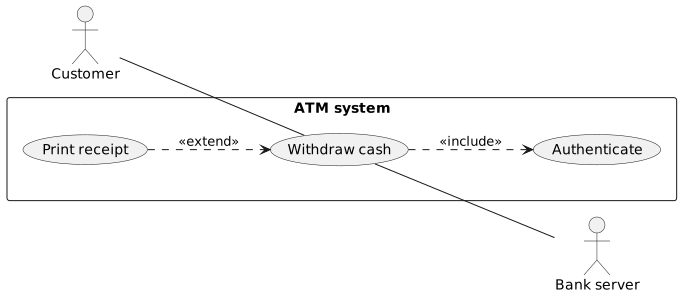
The same idea written in PlantUML, a text-to-diagram tool: you type the text on top and it draws the diagram below.
Concept 11 of 12
Common mistakes
| Mistake | Why it is wrong | Fix |
|---|---|---|
| Steps as use cases (“Enter PIN”, “Click OK”) | too small; no goal | merge into the goal (“Withdraw cash”) |
| Arrows between use cases showing order | use case diagrams do not show sequence | use a sequence or activity diagram |
| «include» arrow drawn towards the base | direction reversed | base → included |
| Database or UI drawn as an actor | they are inside the system | remove them |
| Actors inside the boundary | actors are outside by definition | move them out |
| Dozens of includes | functional decomposition, not goals | keep includes for genuinely shared behaviour |
| No descriptions | the diagram alone is ambiguous | write a description per use case |
Your turn
Your turn: the Library Management System
Before drawing, list from the scenario:
| Question | Your list |
|---|---|
| Who are the actors? | (roles in the scenario: which are primary, which secondary?) |
| What goals does each actor have? | (register, request, reserve, renew, return, pay fine, give feedback, maintain records…?) |
| What is shared by several goals? | → candidate «include» |
| What happens only sometimes? | → candidate «extend» (hint: fines) |
- Is “Issue library card” a goal of the user or of the librarian?
- Are “Add record”, “Delete record” and “Update record” three use cases or one (“Maintain records”)? Justify it.
- Does a student and a staff member do different things? If so, consider actor generalization.
Worked example 1 of 3
Worked example 1
Show the solution
- Actors: Customer (primary), Payment gateway (secondary).
- Use cases: Browse products, Place order, Track order, Log in, Apply coupon.
- Place order «include» Log in (always).
- Apply coupon «extend» Place order (optional; extension point “coupon entered”).
- Payment gateway is associated with Place order.
Worked example 2 of 3
Worked example 2
Show the solution
Worked example 3 of 3
Worked example 3
Show the solution
Practice
Practice (1 of 2)
Try each one on paper first, then check your answer.
Show the answer
Show the answer
Show the answer
Practice
Practice (2 of 2)
Try each one on paper first, then check your answer.
Show the answer
Show the answer
Show the answer
Check yourself
Quiz
Resources
Further learning
Hand-picked material to go deeper. Links open in a new tab.
Resources
Further learning (cont.)
Summary
Summary
- A use case is a user goal plus its scenarios; the diagram shows actors, use cases and the system boundary.
- Actors are roles outside the system: primary actors start use cases, secondary actors support them.
- «include»: always, base → included. «extend»: optional, extension → base.
- Generalization means “is a kind of” for actors or use cases.
- Every use case needs a description with main and alternative flows.
- Avoid steps as use cases, order arrows, and internal parts drawn as actors.